Memory & Context
Most assistants forget everything when the chat closes. LexiChat has two ways to carry things forward: context variables for the handful of facts that are always true about you, and a persistent wiki it writes to and reads back on its own. Both are plain files on your own disk.
compare_arrows Two kinds of memory
They solve different problems and are worth keeping separate.
| Context variables | The wiki | |
|---|---|---|
| Holds | A few short facts that rarely change | Anything worth keeping, and as much of it as you like |
| Who writes it | You, by hand | The AI, on its own — or you, in any editor |
| When it's read | Every message, automatically | When the AI decides it's relevant, by searching |
| Scope | Per profile | Shared by every profile that has it on |
| Costs context | A few tokens per fact | ~560 tokens of instructions, plus whatever it reads |
A rule of thumb: if you would put it on a business card, it's a context variable. If it's something you told the assistant once and expect it to remember, it belongs in the wiki.
badge Context variables
Name/value pairs attached to a profile, added to every conversation as facts about you. The AI uses them when they're relevant and stays quiet about them when they aren't — you don't have to keep saying where you live.
Find them in Settings → Profiles, in the profile editor under Context Variables. Add a row, give it a name and a value, save the profile.
| Name | Value | What it saves you |
|---|---|---|
| location | Gravesend, Kent, UK | "What's the weather?" works without naming the town |
| timezone | Europe/London | Times in answers land in your day, not UTC |
| occupation | Software consultant | Explanations pitched at the right level |
| telegram_chat_id | 764986304 | "Send me a Telegram" needs no ID pasted in |
menu_book The wiki — long-term memory
The wiki is a folder of Markdown pages that outlives any single conversation. Tell LexiChat something worth keeping and it files the fact away without being asked; ask about it weeks later in a brand-new chat and it searches the wiki, reads the page back, and answers from it.
toggle_on Turning it on
Memory is off until you enable it. There are two levels:
folder_open Where the files live
Plain .md files in a folder you own — no database, no cloud, no sync:
| macOS | ~/Library/Application Support/lexichat/wiki |
| Linux | ~/.local/share/lexichat/wiki |
| Windows | %LOCALAPPDATA%\lexichat\wiki |
Pages are organised into folders as the AI sees fit — people/alice.md, events/birthdays.md, projects/. Two files are special:
psychology What it does on its own
With memory on, LexiChat is told to do these without being prompted:
- searchSearch before answering anything about a date, plan, person, project or past conversation — rather than guessing from the current chat alone.
- saveStore durable facts immediately — a name, a date, a preference, a goal — without waiting to be told to remember it.
- mergeUpdate rather than duplicate — search first, then patch the existing page instead of creating a second one on the same subject.
- history_eduLog every change to log.md with the date and a one-line reason.
- cleaning_servicesTidy up occasionally — a lint pass surfaces empty pages, missing index entries and broken links, which it then fixes.
You can also drive it directly: "remember that my sister's birthday is 3 March", "what do you know about the Hartley project?", or "forget what I told you about the old address".
travel_explore How it finds things
A memory you can't retrieve isn't a memory. Searching the wiki runs two passes, because the obvious approach on its own quietly loses things.
Meaning-based search needs an embedding model — a small model that turns text into a position in meaning-space. If you have one installed in Ollama, LexiChat finds it and uses it automatically. If you don't, search stays exact and nothing breaks or complains.
Everything stays local. Pages are sent to your own Ollama to be indexed, exactly like a chat message — no third-party embedding service is involved at any point.
The index
- check_circle Built the first time you search and kept up to date after that. Only pages you've actually edited are re-read, so the first search costs a second or two and later ones are quick.
- check_circle Stored outside the wiki folder, in LexiChat's data folder. Your Markdown stays yours — no machine files mixed in with it.
- check_circle Entirely disposable. Delete it and the next search rebuilds it; nothing you wrote lives only there.
- check_circle Rebuilt from scratch if you change embedding model, since positions from two different models can't be compared.
hub Seeing it all at once
Memory that only surfaces when you ask about it is hard to trust. The Memory Map — the 🧠 button in the toolbar — draws the whole wiki, so you can see what LexiChat has kept about you without asking it a single question.
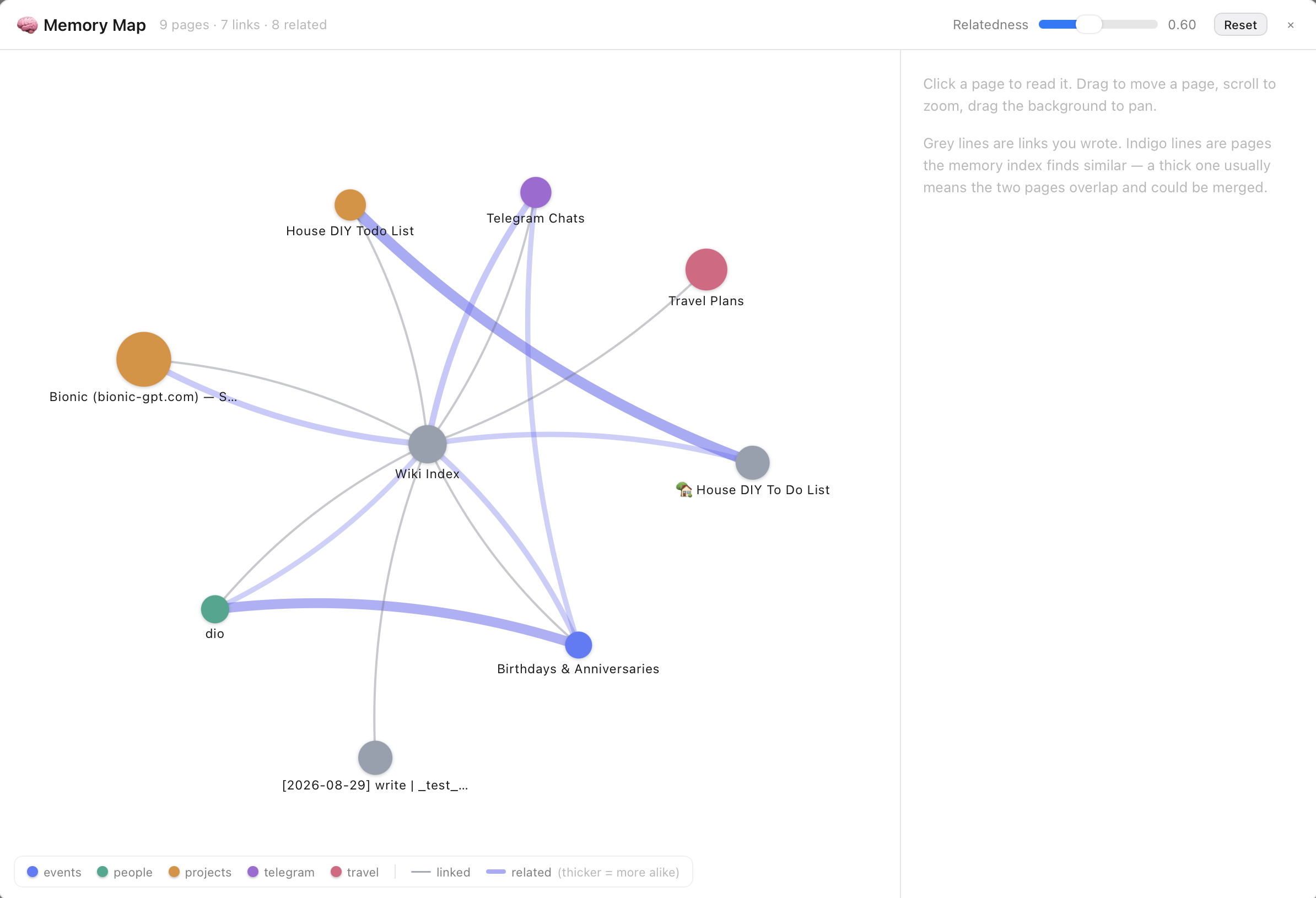
Every page is a circle, coloured by its folder and sized by how much is written on it. Two kinds of line connect them, and the difference is the point:
Click any page to read it alongside the map, with its closest relatives listed and scored so you can walk from one to the next. Drag pages around, scroll to zoom, and pull the Relatedness slider down to reveal looser connections or up to keep only the strong ones.
Without an embedding model the map still draws your written links; the indigo lines simply aren't there. The 🧠 button only appears for profiles that have memory switched on.
build The wiki tools
Enabling memory adds eight tools. You rarely need to name them, but they show up in the trace when you're checking what happened:
| Tool | What it does |
|---|---|
| wiki_search | Find pages, by wording and by meaning. The usual first step — see How it finds things. |
| wiki_read | Read a page back in full. |
| wiki_list | List every page in the wiki. |
| wiki_write | Create a page, or replace one outright. |
| wiki_patch | Change part of a page, leaving the rest alone. |
| wiki_append | Add to the end of a page — how log.md grows. |
| wiki_delete | Remove a page. |
| wiki_lint | Report empty pages, missing index entries and broken links. |
Every path is confined to the wiki folder — these tools cannot read or write anywhere else on your disk, regardless of what the model asks for.
speed What it costs
Memory isn't free, which is why it's opt-in. With it on, every step of every conversation carries roughly 560 tokens of memory instructions plus the eight tool definitions, before your question contributes anything — and the AI spends real time searching and reading pages.
On a small local model with a tight context window that trade can hurt. Two ways to keep it in hand:
- check_circleEnable memory only on the profiles that benefit from it, rather than globally.
- check_circlePrefer context variables for the handful of facts that are always true — a few tokens each, and no searching.
The Debug panel breaks down exactly what each step is carrying, so you can see the cost rather than guess at it.
Meaning-based search, separately
The second search pass costs nothing in context — it runs before the model is asked anything, and only the handful of results it returns are ever shown. What it does cost is a small model on disk (a few hundred megabytes), a second or two the first time you search after editing pages, and an index file that scales with how much you've written.
If you'd rather not have any of that, don't install an embedding model. Search stays exact and everything else works the same.
lock Privacy & portability
Everything here stays on your machine. The wiki is Markdown in a local folder; context variables live in the profile. With a local model, nothing you ask it to remember leaves the computer at all.